


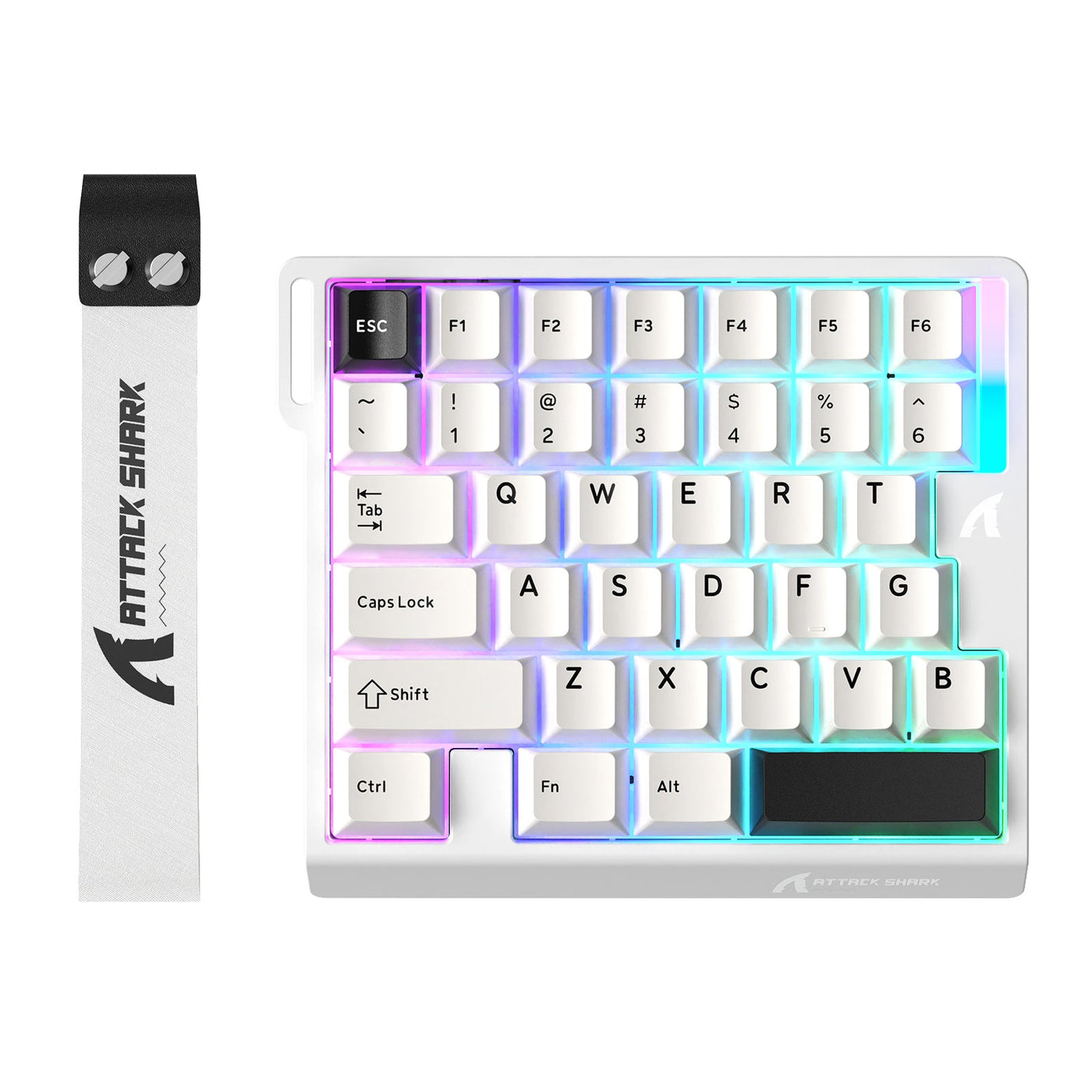
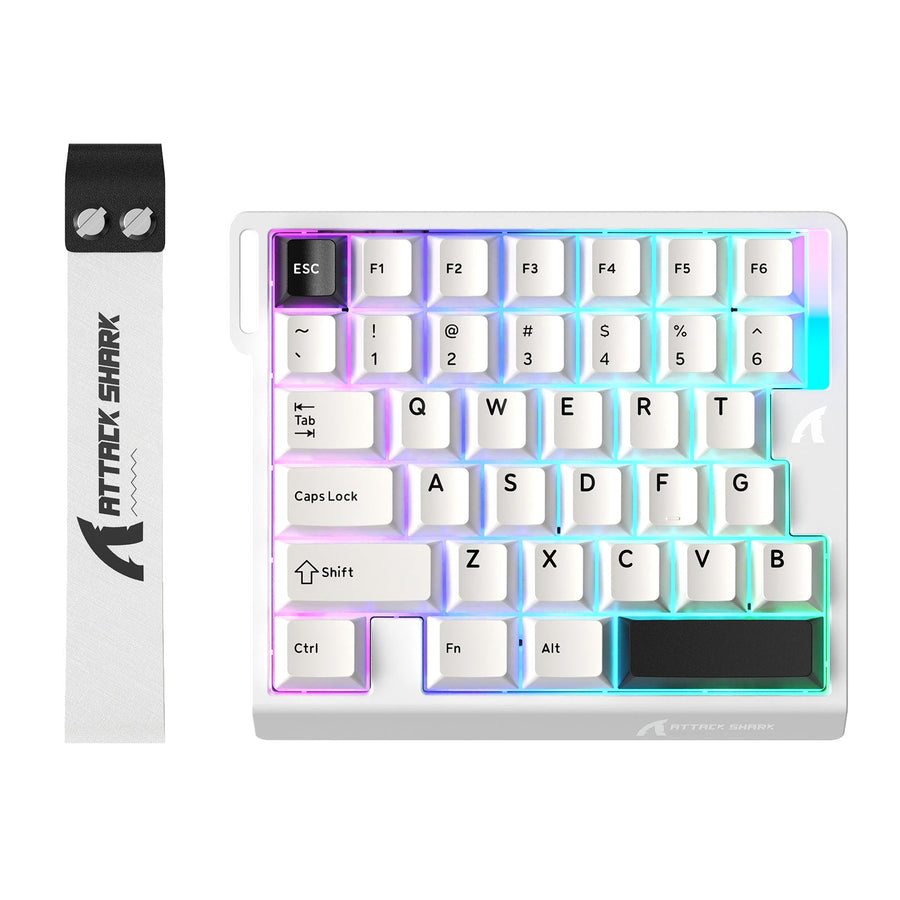
A one-handed keyboard is a compact keyboard or keypad arranged for use with one hand. Instead of reproducing every key on a full-size board, it usually concentrates on a selected group of gaming controls, shortcuts, or other inputs. The exact key coverage varies by model.

That makes it a workflow decision, not an automatic upgrade. This layout may suit a PC gamer with a defined control scheme, a shortcut-heavy user, or someone who intentionally needs one-hand input. It is less likely to replace a standard keyboard when broad typing, navigation, or number entry is part of the daily routine.
What Sets a One-Handed Keyboard Apart
A one-handed keyboard places selected controls within reach of one hand, while a full-size keyboard is designed for broad two-hand typing and navigation. A compact keyboard reduces the size of a conventional layout; a one-hand model may reduce or rearrange its key coverage much more substantially. The practical difference is not just footprint—it is which commands remain directly available. A bounded definition of the category offers useful background, but it does not establish the capabilities of every model.
The layout can vary in several important ways. Check whether the device is intended for the left or right hand, which letters and navigation keys are present, whether functions are assigned to layers, and how it connects to and works with your computer. Do not infer remapping, macro support, dimensions, or operating-system compatibility from the form factor alone.

Some layouts may work as a standalone input device, while others make more sense beside a normal keyboard. If the device does not include a key or command you use regularly, you may need a layer, remapping, another input device, or a different keyboard entirely. A one-handed keyboard option is best evaluated by its current layout and documentation, not by its category label.
One-Handed Keyboard Uses Beyond Gaming
The main uses for this type of device fall into three groups: focused gaming controls, repeated shortcuts, and selected one-hand computer tasks. Each requires a different coverage check, so a layout that works for a game may be a poor choice for typing or office work.
Gaming Controls and Mouse Space
A one-handed gaming keyboard may place movement and action controls under one hand while the other stays on the mouse. This can be useful at a PC desk when the player wants a focused control area, but the fit depends on the game, bindings, and available commands. Compactness alone does not prove faster, more accurate, or more comfortable play. Gaming-focused editorial context can help explain the category, but it is not independent proof of a universal benefit.
Before choosing one for gaming, write down the controls you actually use: movement, abilities, inventory, communication, interaction, and any less frequent commands. Compare that list with the device's layout. Also check whether the intended hand position leaves the mouse, controller, or other equipment where you need it. A space-saving gaming layout may help with desk planning, but it does not verify the coverage of a particular model.
Shortcuts, Macros, and Repeated Tasks
A one-hand layout can be useful for a stable shortcut workflow, but configuration details determine whether it is practical. Review the command group, the required setup method, and whether the device should replace or accompany your regular keyboard.
- App shortcuts: List the commands you repeat, then verify that the exact model can assign or access them. If the workflow depends on layers, confirm how those layers are activated.
- Creative or production controls: Check whether the software, firmware, browser tool, or operating-system settings required for customization are supported on your computer.
- Repeated actions: Determine whether you need ordinary remapping or a macro function, and review any relevant software or game rules before relying on it.
- General typing alongside shortcuts: A macro pad may be a better companion when your normal keyboard already handles letters, punctuation, navigation, and numbers well.
One-Hand Input for Work or Specialized Needs
One-hand input may suit selected computer tasks when the physical arrangement matches the user's hand use and required actions. Accessibility-minded buyers should compare the actual layout, configuration process, and return terms with their own needs rather than assume that every device is suitable. Single-handed keyboard guidance frames this as an individual computer-access question, not a universal category benefit. For typing-focused access methods, one-handed computer access options provide additional context without proving that a gaming keypad will meet those needs.
Typing-focused one-hand systems and gaming keypads are not automatically interchangeable. For document work, programming, or communication, check access to common letters, punctuation, navigation, numbers, and any symbols you use. If those inputs are absent or layered in a way that interrupts your workflow, a standard keyboard alongside a specialized device may be more practical than using the specialized device as a replacement.
One-Handed Versus Standard and Compact Keyboards
A one-handed keyboard trades broad conventional coverage for focused one-hand control. A compact keyboard keeps more familiar functions while reducing its footprint, and a full-size keyboard remains the simplest choice for broad typing, navigation, and number entry. None is the universal winner; the right format depends on what must be available without workarounds.
| Keyboard format | Footprint | Conventional typing coverage | Mouse clearance | Shortcut flexibility | Learning curve | Best-fit workflow |
|---|---|---|---|---|---|---|
| One-handed | Small, specialized footprint | Selective; varies by layout | Often prioritizes room for the other hand, but placement still matters | Depends on layers, remapping, and software | Usually higher if the arrangement differs from familiar keys | Focused gaming controls, defined shortcuts, or selected one-hand input |
| Compact | Smaller than full-size while retaining more of a conventional layout | Moderate to broad, depending on the format | More desk room than full-size in many setups | Usually familiar, with some functions moved or layered | Moderate; some navigation or number functions may change position | General PC use where space matters but typing coverage remains important |
| Full-size | Largest of the three | Broad letters, navigation, function, and number access | Uses more desk width | Broad direct access with fewer layout compromises | Lowest for users accustomed to standard keyboards | Long-form typing, frequent number entry, and mixed everyday work |
The key trade-off is coverage. A one-hand layout may leave more room for a mouse or other equipment, but missing or layered commands can interrupt broad work. A compact board offers a middle path; a full-size board reduces the need to adapt when your tasks change. If desk space is the deciding factor, compare slim keyboard layouts while still verifying the dimensions of the exact product.
For mixed workflows, consider a companion setup. A focused device can handle dedicated controls while a normal keyboard remains available for writing, browsing, or number entry. That arrangement may be more practical than forcing one small layout to cover unrelated tasks.
Who Should Choose a One-Handed Keyboard?
The strongest fit is someone with a defined, repeatable one-hand workflow and a model whose actual layout covers the required controls. The weakest fit is someone who expects a small device to replace broad typing, navigation, and number entry without configuration or a second keyboard.
- Gamers: A one-handed keyboard for gamers is worth considering when the control cluster matches the game's bindings and the hand-to-mouse arrangement works at your desk. The next check is a command inventory, not a promise of speed or accuracy.
- Shortcut-focused users: Consider the layout when you repeat a stable group of commands and can verify remapping, layers, or macros for the exact model. If you mainly need extra hotkeys beside a normal board, compare a macro pad before replacing your keyboard.
- Limited-desk-space shoppers: The format may fit when reclaiming desk area matters more than having every conventional key directly available. Measure the proposed placement and decide whether missing coverage would force a second device.
- One-hand workflow users: A one-hand keyboard for PC use may fit selected work or access needs when reach, key arrangement, and required commands align. Compare the layout and return policy with your own workflow; do not treat the category as a general comfort or accessibility guarantee.
- Long-form typists and frequent number-entry users: This is usually a weaker fit unless the model clearly covers the letters, punctuation, navigation, and numbers you use. A compact or full-size keyboard is often the more direct starting point for broad text entry.
- Buyers focused on hand position: Treat accessories as setup preferences rather than health solutions. If you are comparing wrist rest options, use them to evaluate your preferred positioning, not as proof that a particular keyboard prevents pain or fatigue.
Use this self-check: Can you name the main tasks the device must cover, list the commands required for those tasks, and confirm that the exact model and computer support the needed configuration? If not, the purchase carries a higher risk of becoming an expensive companion device you did not plan for.
Checks Before Choosing a One-Handed Layout
The safest way to choose a one-handed keyboard is to start with the workflow and required keys, then verify physical fit, configuration, compatibility, and retailer terms. A product page that shows a compact shape is not enough to establish that it will support your setup.
- Define the primary workflow. Write one sentence describing what the device must do: for example, provide game controls beside a mouse, trigger repeated app shortcuts, or support selected one-hand computer tasks. If you cannot identify the main workflow, postpone the purchase.
- Inventory must-have inputs. List every required key or command, separating essential controls from optional conveniences. For typing-heavy work, include letters, punctuation, navigation, numbers, and symbols—not just the most common keys.
- Check hand orientation and reach. Confirm whether the arrangement is designed for the left hand, right hand, or either side. Sketch or measure where it will sit relative to your mouse and monitor, and check whether the intended reach feels workable for your setup.
- Verify configuration support. Look for exact information about remapping, layers, macros, firmware, included software, browser configuration, or operating-system remapping. Also check whether settings persist when the software is closed or the device is connected to another computer.
- Confirm platform and connection compatibility. Verify the connection type, supported operating systems, required drivers or software, and whether advanced functions work on your laptop, desktop, or Mac. Do not assume that a device advertised for PC works identically across every platform.
- Review physical and ownership details. Check dimensions, cable or wireless requirements, included accessories, key feel, noise expectations, warranty coverage, and return terms. For general switch and layout questions, a mechanical keyboard buying guide can help structure your comparison, but the exact listing remains the authority for model-specific facts.
- Apply the no-fit boundary. If the device cannot clearly cover the core workflow, choose a fuller keyboard or a companion-device approach instead. Do not purchase first and hope layers or remapping will solve an unverified coverage problem.
After these checks, you can inspect a magnetic switch keyboard range or another relevant option with a defined comparison in mind. The goal is not to find the smallest keyboard; it is to find the layout that covers your actual work without creating a new bottleneck.
FAQs
These questions cover common compatibility, typing, configuration, and rules checks. The exact layout and documentation still determine whether a particular device fits your workflow.
Can a One-Handed Keyboard Work With a Laptop or Mac?
Yes, but compatibility depends on the connection method, operating-system support, and whether configuration requires dedicated software, a browser tool, or only standard keyboard input. Before ordering, check the exact listing for Mac or laptop support, required downloads, and whether remapped settings remain available without the configuration tool.
Is a One-Handed Keyboard Better for Left-Handed Users?
Not automatically. Compare the device's physical key arrangement with your mouse position, the hand you want to use for shortcuts, and the tasks you plan to perform. A left-hand keyboard for typing may be a poor fit if the layout places required keys away from your natural reach, while a right-hand design may conflict with mouse use.
Can a One-Handed Keyboard Replace a Regular Keyboard for Everyday Typing?
Only when its layout covers your regular typing, navigation, and number-entry tasks without impractical workarounds. For mixed or long-form typing, keep a normal keyboard available and use the specialized device as a companion. Before deciding, test the layout against a real sample of the words, symbols, and shortcuts you use each day.
Do One-Handed Keyboards Need Special Software to Remap Keys?
Some do, while others may use onboard firmware, browser-based configuration, operating-system remapping, or third-party tools. The important question is which method the exact model supports and whether your settings persist without that tool. Check software requirements before buying if your workflow depends on layers, macros, or custom key assignments.
Are One-Handed Keyboards Allowed in PC Esports Games?
Rules vary by game, tournament, and event. Macros, remapping, automated inputs, and dual-action features may receive different treatment, so do not assume that a device is permitted because it functions technically. Check the current rules for the specific game and competition before using a one-handed gaming keyboard in an organized match.